Layered Daily Notes
This guide will show you how to create a layered hierarchy of Daily, Monthly, and Yearly Notes. The end result will allow you to quickly move through your Daily Notes, and see them in the context of the month and year they belong to.
flowchart BT
	D1(2024-04-12) & D2(2024-04-13) -->|month| M1(2024-04) -->|year| Y1(2024)
	D3(2024-05-07) & D4(2024-05-09) -->|month| M2(2024-05) -->|year| Y1(2024)
There are various ways this structure can be achieved. The method in this guide will use the Templater plugin to add templates with Typed Links in them to point up to the Monthly and Yearly Notes. Then, using Breadcrumbs’ Date Notes feature (different from the core Daily Notes plugin), we’ll point each Daily Note to the note following it (yesterday/tomorrow).
1. Setup up Your Fields
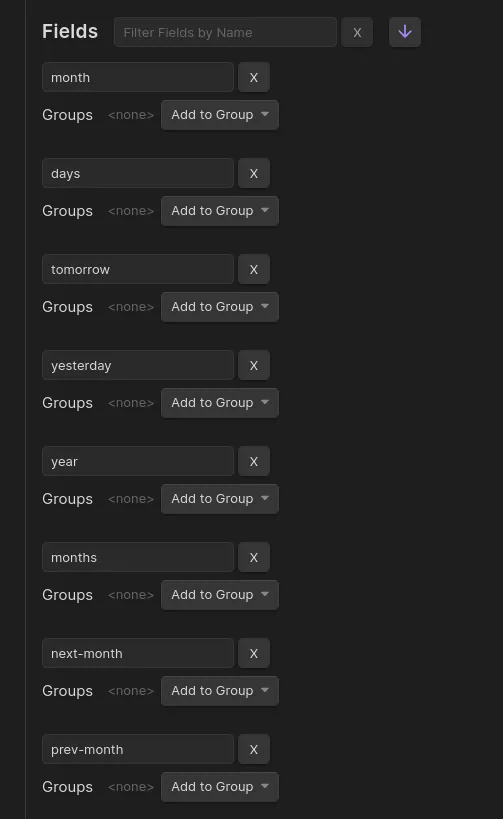
Section titled “1. Setup up Your Fields”We’ll use some more specific fields than the default up, down, same… For Daily Notes, add the following fields. This can be done in your Edge Fields settings, under Settings > Edge Fields.
month: Points up from day to monthdays: Points down from month to daytomorrow: Point “right” from current day to next dayyesterday: Points “left” from current day to previous day
And for Monthly Notes, add these fields:
year: Points up from month to yearmonths: Points down from year to monthnext-month: Points “right” from current month to next monthprev-month: Points “left” from current month to previous month
The end result should look like this:
2. Daily Note Template
Section titled “2. Daily Note Template”Next, we’ll create a new daily note template (or add to your existing one). Each daily note will point up to the month it’s in - adjusting the date format to your preference.
Templates/Daily Note.md:
---month: "[[<% tp.date.now("YYYY-MM") %>]]"---
## Tasks
- [ ]
graph BT 2(2024-04-27) -->|month| 1(2024-04)
3. Monthly Note Template
Section titled “3. Monthly Note Template”Similarly, create a Monthly Note template with the following, pointing up to the corresponding year, and “right” to the next month:
Templates/Monthly Note.md:
---year: "[[<% tp.date.now("YYYY") %>]]"next-month: "[[<% tp.date.now("YYYY-MM", "P1M") %>]]"---
## Daily Notes
```breadcrumbstype: treefields: [days]```
Now each Monthly Note will point up to the corresponding Yearly Note, and next to the month after it. A codeblock tree lists all daily notes from the current month.
graph BT
	1(2024-04) -->|year| 2(2024)
	1 -->|next-month| 3(2024-05)
4. Date Notes
Section titled “4. Date Notes”Date Notes use the date format of your existing Daily Notes to add edges between them in chronological order. To enable this:
- Go to Breadcrumbs Settings
- Toggle Date Notes on using
Edge Source > Date Notes > Enable - Change the Default Field setting to
tomorrow - Enter your preferred date format (in Luxon notation)
- Optionally toggle “Stretch to Existing”, depending on what behaviour you want if there are missing Daily Notes
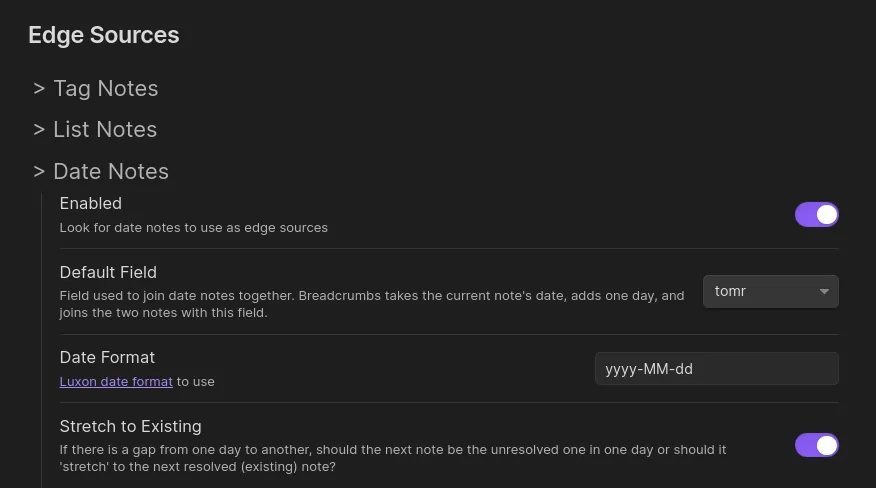
Now edge of your Daily Notes should automatically point tomorrow to the following day’s note.
flowchart LR
	1(2022-01-01) -->|tomorrow| 2(2022-01-02) -->|tomorrow| 3(2022-01-03)
5. Implied Relationships
Section titled “5. Implied Relationships”In the previous steps, we used the month field in the Daily Note template, but not the months field, which should point back down from month to day. Similarly, we only added the next-month field to the Monthly Note template, but not the prev-month field. And lastly, we used the tomorrow field for Date Notes, but didn’t specify the yesterday field anywhere. This is because Breadcrumbs can infer these relationships - they’re “opposites”, in a sense.
To set this up, open Settings > Implied Relations > Transitive, and add the following Transitive Implied Relations:
[month] <- days
-_--days.awEUbRWQ_2ruFbM.webp)
[tomorrow] <- yesterday
-_--yesterday.rld5aLam_1YSwVR.webp)
[next-month] <- prev-month
-_--prev-month.D8sJa8Rf_2OJxs.webp)
Now, when you rebuild the graph, Breadcrumbs will apply these rules to your explicit edges, by adding the implied edges above. It “fills in the opposite direction”.
5. Leverage
Section titled “5. Leverage”You’re all set up! Now each Daily Note will point upwards to the month and tomorrow to the following day, and Monthly Notes point up the the year.
Extras/Advanced Usage
Section titled “Extras/Advanced Usage”day/events Fields
Section titled “day/events Fields”Add some additional fields “below” the Daily Note fields, to capture events that happened on a particular day:
day: Point up to the day something happenedevents: Point down from a particular day to an event that happened
For example, in a university lecture note, you can point up to the day it happened:
---day: [[2024-04-13]]---
## Calculus
...
Then when viewing the Daily Note [[2024-04-13]], you’ll see all the events that happened on that day in the Matrix View or Tree View pointing down with the events field.
Moving around between Daily Notes and other Layers
Section titled “Moving around between Daily Notes and other Layers”Assign hotkeys to the Jump to First Neighbour command to quickly move back and forth between yesterday and tomorrow.