Edge Fields
The starting point of Breadcrumbs is fields, which let you add types to your links. For example, the [[Father]] note could have a child field pointing to [[Me]], and [[Me]] could have a parent field pointing to [[Mother]]:
Father.md
---child: "[[Me]]"---Me.md
---parent: "[[Mother]]"---
<!-- Works with Dataview inline fields, too -->
parent:: [[Mother]]
This would result in the following graph:
flowchart LR
	1(Father) -- child --> 2(Me)
	2 -- parent --> 3(Mother)
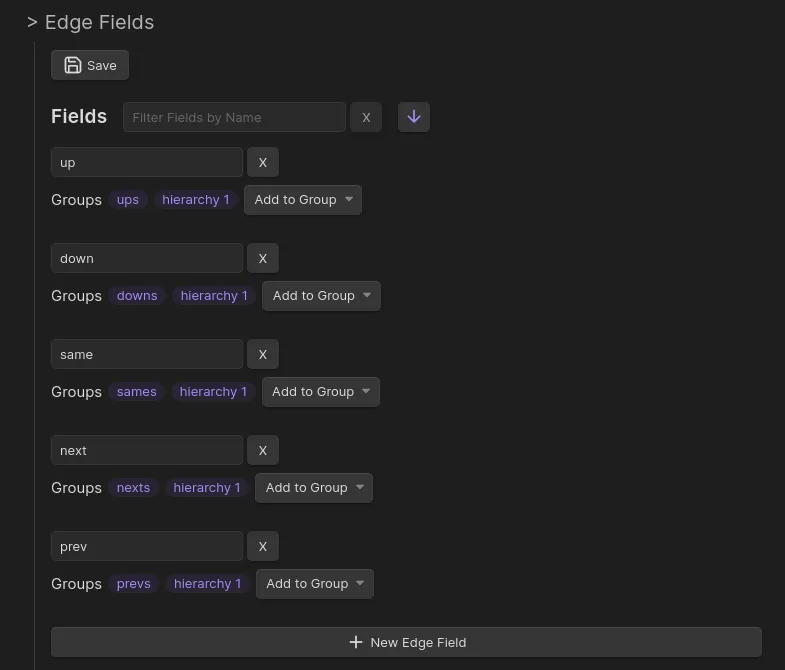
By default, there will be 5 starting fields: up, same, down, next, and prev, representing 5 different directions. These can take you quite far, and you may be happy using just these fields, but you can customise them further. To get started, you need to tell Breadcrumbs which other fields you intend to use to “type” your links. This can be done under Settings > Edge Fields:
The names are only labels — Breadcrumbs attaches no inherent meaning to them. The table below shows how most people read the five defaults, but nothing is enforced: rename them, delete them, or add your own, and group them however you like (see Field Groups).
| Field | Conventional reading |
|---|---|
up |
parent / broader note |
down |
child / narrower note |
same |
sibling |
next |
following note in a sequence |
prev |
preceding note in a sequence |
The directional wording (parent/child/sibling) is just convention. The structural behaviour Breadcrumbs ships with is the default implied reverse rules — up↔down, next↔prev, and same↔same (configurable under Implied Edge Builders) — plus opt-in builders that populate these fields automatically, such as Date Notes, which links sequential date notes via next/prev and to their enclosing period (week/month/quarter/year) via up.
For example, you can model personal relationships using fields like parent, child, and sibling. Or you can create a layered system of daily notes using fields like day, month, and year.
Mermaid Arrow Style
Section titled “Mermaid Arrow Style”Each edge field has an optional Mermaid arrow shape setting, available in Settings → Edge Fields as a dropdown next to the field label. This controls how that field’s edges appear when rendered in a Mermaid codeblock.
Available shapes:
| Value | Description |
|---|---|
| (default) | Use the codeblock’s default arrow logic |
--> |
Solid arrow |
--- |
Solid line, no arrowhead |
==> |
Thick arrow |
=== |
Thick line, no arrowhead |
-.-> |
Dotted arrow |
-.- |
Dotted line, no arrowhead |
--o |
Circle endpoint |
--x |
Cross endpoint |
When two edges between the same pair of notes share the same custom arrow on both directions, they collapse into a single bidirectional line (e.g. ==> becomes <==>). When they differ, each renders as a separate one-way line.
Fields without a custom arrow keep the existing default behaviour (solid --> / dotted -.-> based on explicit vs implied, with optional arrowheads via the mermaid-arrow codeblock option).
Hide in side views
Section titled “Hide in side views”Each edge field has a Hide in side views checkbox in Settings → Edge Fields, next to the field label. When checked, the field is kept everywhere it normally lives — its field groups, the graph, and codeblocks — but is no longer rendered in the Matrix and Tree side views.
This is handy for structural fields you rely on for traversal but don’t want cluttering the side panels. Unchecking it restores the field to those views immediately.
The toggle affects only the Matrix and Tree side panels. Codeblocks still show the field (they take an explicit field list), and the Trail / Previous-Next page views are unaffected.
Self is sibling
Section titled “Self is sibling”The Self is sibling control on the Implied relations settings page controls the self-is-sibling implied relation. Fields listed here get an automatic self-loop implied edge for every note that participates in an edge of that type (as either source or target).
In practice: if same is in the Self list, a note like Blue — which has same connections to Green and Red — will also appear in its own same list in the Matrix and Tree views. This restores the classic Breadcrumbs behaviour from earlier versions.
Default: ["same"]
To enable it for another field (e.g. a custom sibling field), click Add Field in the Self is sibling section (Implied relations page) and select it.