Matrix View
The Matrix View appears on the side of the editor, and shows the immediate outgoing neighbours of the current note, grouped by their field.
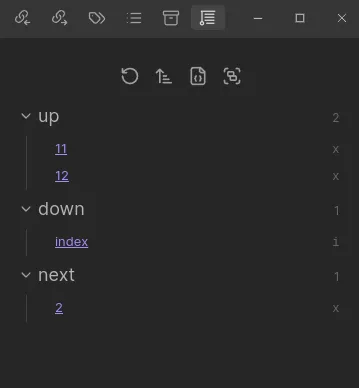
On the right side of each link, you’ll see an x or i, indicating if that edge is explicit or implied. Hover over the icon to see the source of real edges, and the kind of implied edges (as well as the round they were added in).
Settings
Section titled “Settings”Change under Settings > Views > Matrix:
- Collapse: Collapse each group of fields by default
- Custom Field Sorting: When enabled, sort the field groups in the matrix by a custom order you define
- Field Order: (Visible when Custom Field Sorting is on) Set the exact order in which edge fields appear in the matrix
- Sort: Change the edge sorter used for the items within each field group
- Show Attributes: Choose which edge attributes show (when hovering the
x/iicon) - Field Groups: Choose which field groups are shown
- Lock View: Lock the matrix view to a specific file, so it doesn’t change as you navigate
- Lock Path: The file path to lock the matrix view to (overrides the current note)
- Note Display Options: Three toggles — Folder, Extension, and Alias — that control how note links are displayed in the matrix
Search
Section titled “Search”A fuzzy search input in the Matrix View toolbar filters displayed notes by title. Fields with no matching notes are hidden. Click the search icon in the toolbar to toggle it.