Transitive Implied Relations
This category of Implied Edge Builders can be thought of as a chain of fields which collapse down to one field.
In the settings for this relationship:
--_-grandparent.H3XJAG2t_Z29lxwU.webp)
Options
Section titled “Options”- Edge Chain: The chain of fields required for the rule to match
[parent, parent]in the above example
- Closing Field: Once a match is found, which field closes the chain off
grandparentin this example
- Close Reversed: Whether the close the chain from start to finish, or vice versa
false(or unchecked) in this example, because it closes from start to finish
- Rounds: How many rounds to run the rule for
1in this example- Capped at
10. New rules default to the max (10); the five built-in rules ship at1.
- Name (optional): Give a label to the rule. By default, the
[field] -> closesyntax will be used.
Examples
Section titled “Examples”There are many different rules you can build with this syntax
Opposite Direction
Section titled “Opposite Direction”If you have to fields up and down, you can make them semantically “opposite” of one another with the following two rules (note how this rule requires the “Close Reversed” option toggled on, so that the end node points back to the start node):
[up] <- down
flowchart LR
	A -->|up| B
	B -.->|down| A
[down] <- up
flowchart LR
	A -->|down| B
	B -.->|up| A
Same Sibling is Sibling
Section titled “Same Sibling is Sibling”If A and B both share the same sibling, mark them as siblings as well.
[sibling, sibling] -> sibling
graph LR
	A -->|sibling| B
	B -->|sibling| C
	A -.->|sibling| C
Siblings Parent is Parent
Section titled “Siblings Parent is Parent”If A and B are siblings, then make A’s parent B’s parent, as well.
[sibling, parent] -> parent
graph LR
	A -->|sibling| B
	B -->|parent| C
	A -.->|parent| C
Parents Sibling is Aunt/Uncle
Section titled “Parents Sibling is Aunt/Uncle”If A’s parent is B, and B is the sibling of C, then make C the aunt/uncle of A.
[parent, sibling] -> aunt-uncle
graph LR
	A -->|parent| B
	B -->|sibling| C
	A -.->|aunt-uncle| C
Parents Child is Sibling
Section titled “Parents Child is Sibling”If A and B both have the same parent, mark them as siblings.
[parent, child] -> sibling
graph LR
	A -->|parent| B
	B -->|child| C
	A -.->|sibling| C
Cousin is Sibling
Section titled “Cousin is Sibling”If A and B are cousins, mark them as such.
[parent, sibling, child] -> cousin
graph LR
	A -->|parent| B
	B -->|sibling| C
	C -->|child| D
	A -.->|cousin| D
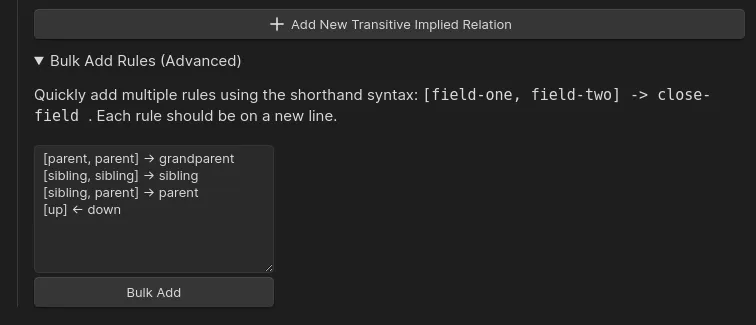
Bulk Add Rules
Section titled “Bulk Add Rules”You can also add transitive rules in bulk, using the syntax shown above ([field-one, field-two] -> close-field). To do so, scroll down to the bottom of the Transitive Implied Relations settings and open the “Bulk Add Rules” dropdown. Then, paste a new-line separated list of rules into the input area, and click “Bulk Add”.